Superpowers Plugin Explained: The AI Skills Framework for Claude, GPT, Cursor & Modern Coding Agents
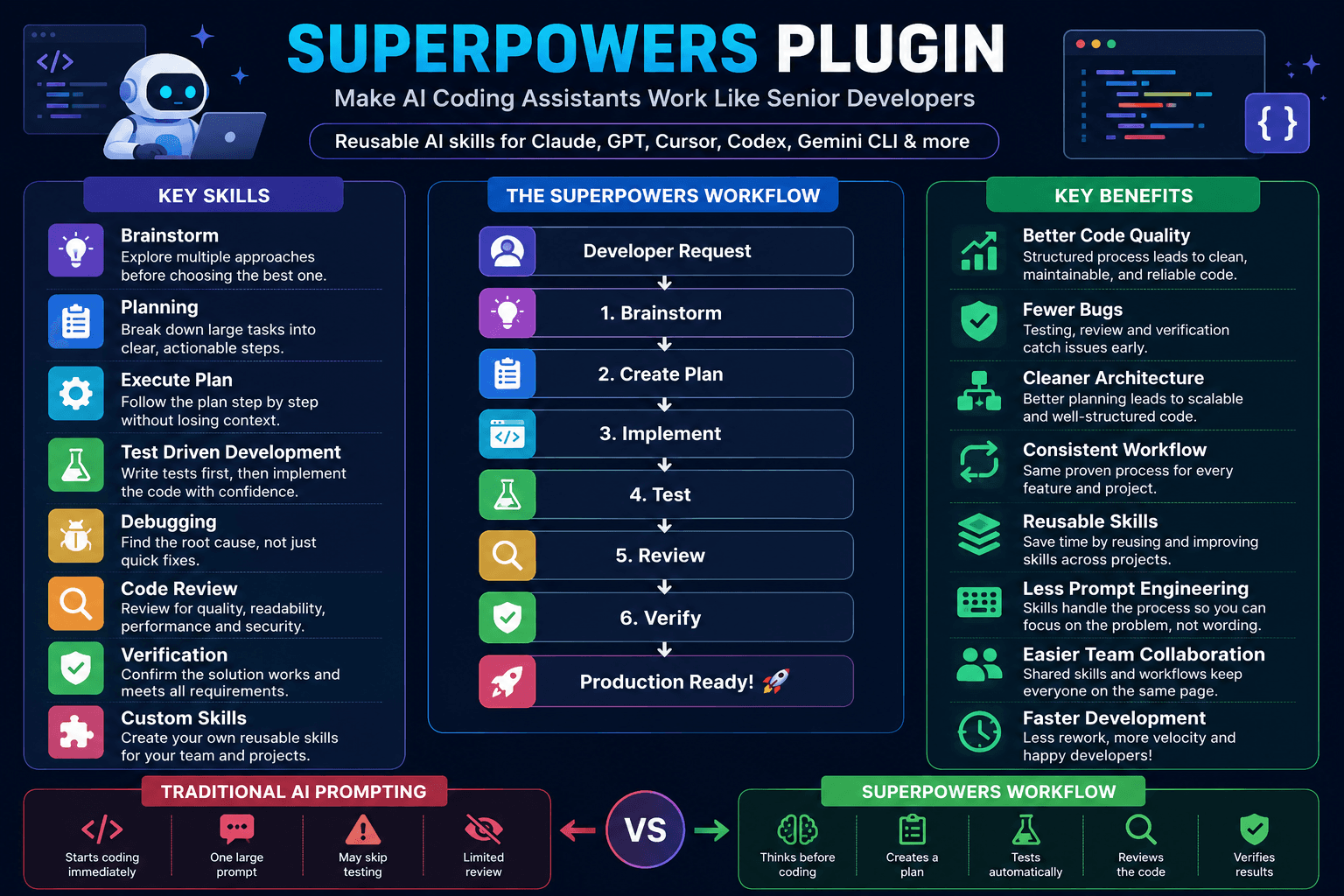
Superpowers Plugin Explained: Make AI Coding Assistants Work Smarter
AI coding assistants have changed how developers write software.
Today, tools like Claude, ChatGPT, Codex, Cursor, and Gemini CLI can generate code, explain complex logic, fix bugs, and even build complete applications.
However, one common problem remains.
Most AI assistants try to solve everything right away.
They often skip important software engineering steps like planning, reviewing, testing, and verifying the final result. This usually works for small tasks. But as projects get bigger, the quality of the generated code declines.
This is exactly where Superpowers comes in.
Instead of giving AI a larger prompt, Superpowers teaches it better development habits.
Rather than acting like a simple code generator, the AI begins to function more like an experienced software engineer who thinks before writing code.
What is Superpowers?
Superpowers is an open-source collection of reusable AI skills created by Obra Studio.
- GitHub Repository: obra/superpowers
- Official Skills Documentation: Using Superpowers Documentation
Instead of storing prompts, Superpowers stores structured workflows.
Each workflow teaches the AI how to solve a specific type of problem.
For instance, instead of just asking:
Build an authentication system.
The AI is encouraged to first:
- Understand the problem
- Explore different solutions
- Create a plan
- Implement step by step.
- Test the code
- Review everything
- Verify the final output.
The result is usually cleaner, easier to maintain, and less likely to have hidden bugs.
Why Was Superpowers Created?
Imagine how an experienced developer works.
They rarely open their editor and immediately start coding.
Instead, they typically:
- Understand the requirements
- Consider different approaches
- Create a simple implementation plan.
- Build the feature
- Test everything
- Review the code
- Make improvements if needed.
Traditional AI assistants often skip the first three steps.
Superpowers introduces these missing software engineering practices into AI-assisted development.
Instead of telling AI what to build, it also teaches AI how to do it.
How Superpowers Work
Every skill focuses on one phase of the development process.
Instead of a single large prompt, the work is broken down into smaller, more organized steps.
This reduces mistakes and makes the AI much easier to guide.
Why Developers Like It
Superpowers don’t make Claude or GPT smarter.
Instead, it helps them work smarter.
That small difference has a significant effect.
Developers often notice:
- Better architecture decisions
- More consistent code
- Fewer repeated mistakes
- Easier debugging
- Cleaner project structure
- Better documentation
- Less prompt engineering
Instead of writing long prompts every day, you can reuse the same effective workflows across different projects.
This is particularly helpful when working on medium or large applications.
Installing Superpowers
Installing Superpowers is simple. Depending on your preferred AI assistant, follow the quick steps below:
Claude Code
Install the plugin directly from the official marketplace:
/plugin install superpowers@claude-plugins-officialAlternatively, add the community marketplace and install from there:
/plugin marketplace add obra/superpowers-marketplace
/plugin install superpowers@superpowers-marketplace
Antigravity
Install the plugin directly from the GitHub repository:
agy plugin install https://github.com/obra/superpowersNote: Antigravity automatically executes the plugin’s startup hook, activating Superpowers from the first message.
Codex
You can install Superpowers through either the Codex interface or the CLI:
- Codex App: Open the Plugins sidebar, find
Superpowersunder the Coding category, and click the + button. - Codex CLI: Type
/pluginsto open the search interface, search forsuperpowers, and selectInstall Plugin.
Kimi Code
Install from the Kimi plugin marketplace or directly via the repository URL:
Open the manager using /plugins, go to Marketplace > Superpowers, and install it.
Or run:
/plugins install https://github.com/obra/superpowersGitHub Copilot CLI
Add the community marketplace and install the plugin:
copilot plugin marketplace add obra/superpowers-marketplace
copilot plugin install superpowers@superpowers-marketplace
Other Environments
For other AI coding assistants, check the official Superpowers GitHub Repository for manual setup guides.
Once installed, these skills serve as reusable workflow blocks that your coding assistant can use whenever needed.
Understanding the Built-in Skills
The real strength of Superpowers lies in its collection of reusable skills.
Each one focuses on solving a different aspect of software development.
1. Brainstorm
One of the biggest mistakes AI assistants make is choosing the first solution they think of.
The Brainstorm skill addresses this issue.
Instead of writing code right away, the AI first considers multiple ways to solve the problem.
For example, imagine you are building an authentication system.
Instead of directly generating code, the AI might compare different methods, such as:
- Session-based authentication
JWTauthenticationOAuthPasskeys
It can explain the pros and cons of each option before recommending one.
This helps you make better technical decisions rather than just accepting the AI’s first suggestion.
2. Planning
After selecting an approach, the next skill creates an implementation plan.
Large features can quickly become unwieldy if everything is built at once.
The Planning skill breaks one big task into several smaller tasks.
For example, if you’re building an e-commerce checkout process, the AI might create a plan like this:
- Design the database schema.
- Create the API endpoints.
- Build the payment service.
- Handle order creation
- Update inventory
- Send confirmation emails
- Write tests
Instead of tackling everything at once, you now have a clear roadmap.
This also makes it easier to track progress and review completed work.
3. Execute the Plan
Once the plan is ready, the AI begins implementing it.
The key difference is that it follows the plan rather than jumping between unrelated tasks.
This creates a much more predictable workflow.
If something changes later, you only need to update one part of the plan instead of rewriting everything.
This approach is especially useful for larger projects where multiple features depend on each other.
4. Test-Driven Development (TDD)
Many developers recognize the importance of testing, but it’s easy to overlook when using AI.
The Test-Driven Development skill reminds the AI to consider expected behavior before writing code.
Instead of only asking:
Build a shopping cart.
The AI also thinks about questions like:
- What should happen if the cart is empty?
- What if the quantity becomes zero?
- What if the product is out of stock?
- How should discounts be applied?
- What happens when an invalid coupon is used?
Considering these scenarios early often results in stronger and more reliable code.
5. Debugging
When something goes wrong, many AI assistants immediately start changing code.
Sometimes that works.
Other times, it makes the problem worse.
The Debugging skill follows a more structured process.
Instead of guessing, it tries to answer questions like:
- What exactly is failing?
- When did it start?
- Which recent changes might have caused it?
- Can the issue be reproduced?
- What is the root cause?
Only after understanding the problem does it suggest a fix.
This saves time and avoids introducing new bugs.
6. Code Review
Writing code is only part of software development.
Reviewing the code is just as important.
The Code Review skill encourages the AI to check its own work before finishing the task.
During a review, it may consider:
- Is the code easy to read?
- Are variable names clear?
- Is there duplicate logic?
- Can performance be improved?
- Are there potential security issues?
- Is the code following project conventions?
This additional review step often catches problems that could otherwise be missed.
7. Verification
Many AI tools stop after generating code.
Superpowers adds one final step.
Verification.
The AI checks whether the solution meets the original requirements.
For instance, if the task was:
Add user profile editing.
Verification might include checking that:
- Users can update their name.
- Email validation works
- Invalid input is rejected.
- Database records are updated correctly.
- Existing data is not lost.
Instead of assuming everything works, the AI confirms it actively.
This simple habit can prevent many production bugs.
8. Create Your Own Skills
One of the most powerful features of Superpowers is that you are not limited to the built-in skills.
You can create your own reusable workflows.
Imagine your team builds REST APIs every week.
Instead of writing the same prompt each time, you could create a custom API development skill that always reminds the AI to:
- Design the database model.
- Create request validation
- Build controllers
- Add authentication
- Write unit tests
- Generate API documentation
- Review the code
The next time you build an API, you just reuse that skill.
This saves time and gives your team a consistent development process.
Traditional Prompting vs. Superpowers
| Traditional AI Prompting | Superpowers Workflow |
|---|---|
| Starts coding immediately | Thinks before coding |
| One large prompt | Small reusable skills |
| May skip planning | Planning comes first |
| Testing is optional | Testing is encouraged |
| Little verification | Final verification step |
| Easy to lose context | Clear and structured workflow |
The goal isn’t to make the AI generate more code.
The goal is to make it generate better code.
A Real Development Example
Let’s say you’re building a blog application using Next.js and Express.js.
Without Superpowers, you might ask:
Build a blog system with authentication.
The AI immediately starts writing code.
With Superpowers, the workflow becomes much more organized.
Instead of getting hundreds of lines of code at once, you receive a structured implementation that is much easier to understand and maintain.
Why Superpowers Make Developers More Productive
Superpowers does not aim to replace developers.
Instead, it helps developers work more efficiently with AI.
Think of it as giving your AI assistant a checklist before starting work. Instead of rushing to generate code, it follows a process that experienced software engineers already use.
Here are some benefits developers notice:
- Better code quality because the AI plans before coding.
- Fewer bugs from encouraging testing and verification.
- Cleaner architecture through brainstorming and planning.
- Less prompt writing because reusable skills replace long prompts.
- More consistent output across different projects.
- Easier onboarding since team members can reuse the same workflows.
- Better collaboration because every feature follows a similar development process.
Whether you’re building a personal project or working with a team, having a repeatable workflow makes development smoother.
Best Practices
To get the most out of Superpowers, follow these simple tips:
Start with Small Tasks
Don’t ask the AI to build an entire application in one request.
Instead, break the work into smaller features.
For example:
- ✅ Build the authentication system.
- ✅ Create the blog API.
- ✅ Add comments.
- ✅ Implement search.
Smaller tasks are easier to review and improve.
Let the AI Think First
It can be tempting to ask the AI to just “write the code.”
Instead, ask it to brainstorm and create a plan first.
Spending one extra minute planning can save much more time later.
Verify Every Result
Never assume AI-generated code is perfect.
Always verify:
- Does it meet the requirements?
- Does it compile?
- Do the tests pass?
- Are edge cases handled?
Verification is one of the biggest strengths of Superpowers.
Create Reusable Skills
If you often build the same type of project, create a custom skill.
For example:
- REST API Development
- Next.js Feature Development
- React Component Review
- Database Migration
- Security Review
- Performance Optimization
Over time, your own skill library becomes more valuable than writing new prompts every day.
Is Superpowers Better Than Prompt Engineering?
Not exactly.
Prompt engineering and Superpowers solve different problems.
Prompt engineering helps you ask better questions.
Superpowers help the AI follow a better development process.
The two work well together.
A good prompt tells the AI what to build.
A Superpowers skill tells the AI how to build it.
Who Should Use Superpowers?
Superpowers are useful for almost anyone who writes code with AI.
It is especially helpful for:
- Frontend developers
- Backend developers
- Full-stack developers
- AI engineers
- Open-source contributors
- Freelancers
- Startup teams
- Students learning software engineering
If you already use Claude, ChatGPT, Cursor, Codex, or Gemini CLI every day, adding structured skills can improve the quality of your AI-assisted development.
Frequently Asked Questions
Does Superpowers only work with Claude?
No.
Superpowers is designed to work with multiple AI coding assistants, including Claude Code, Codex CLI, Cursor, Gemini CLI, GitHub Copilot CLI, OpenCode, and other compatible tools.
Always check the official documentation for the latest list of supported integrations.
Is Superpowers a prompt library?
No.
A prompt library stores reusable prompts.
Superpowers stores reusable development workflows called skills.
These skills guide the AI through planning, implementation, testing, review, and verification.
Do I need to know prompt engineering?
Not necessarily.
Basic prompting is still useful, but Superpowers reduces the need to write long and complicated prompts because many best practices are already built into its skills.
Can I create my own skills?
Yes.
One of the best features of Superpowers is the ability to create custom skills for your projects or your team’s workflow.
This allows you to standardize how AI helps with development across multiple projects.
Final Thoughts
AI coding assistants become more capable every month.
But better models alone don’t always lead to better software.
Good software comes from following a good development process.
That’s exactly what Superpowers brings to AI-assisted development.
Instead of treating AI like a code generator, it encourages the same habits that experienced developers use every day:
- Think before coding.
- Create a plan.
- Build step by step.
- Test your work.
- Review the code.
- Verify the final result.
These habits may seem simple, but they can greatly impact the quality of the software you build.
If you’re already using AI tools like Claude, ChatGPT, Cursor, or Gemini CLI, consider exploring Superpowers. It helps transform AI from a fast code generator into a more reliable development partner.
As AI continues to evolve, structured workflows like Superpowers may become just as important as choosing the right model.
References
- Superpowers GitHub Repository: obra/superpowers
- Official Superpowers Documentation: Using Superpowers